

For anyone who spends more time behind the wheel, the car has become one of the convenient places to give their devices a power boost. Whether it's a daily commute, school run, traffic jam, or weekend road trip, those minutes during the drive make in-car charging an essential part of the everyday charging routine. Yet most people simply plug in and go, without giving much thought to how they're charging.
It's only when problems arise that the details start to matter. Hot cabin temperatures can affect battery health, built-in USB ports may not provide enough power for today's smartphones, and leaving a charger plugged in after the engine is switched off can create a small but unnecessary drain on the car battery.
Fortunately, a few simple charging habits can help protect both your phone and your vehicle. They're easy to adopt, require little ongoing effort, and can make a meaningful difference to battery performance over time. Here are a few dos and don'ts to help you navigate the use of a car charger.
Do:
Use a certified car charger

Car electrical systems operate differently from home wall outlets, with voltage that fluctuates depending on engine speed, load, and whether other systems are drawing power simultaneously. Poorly designed or low-quality chargers often lack the voltage regulation needed to manage these fluctuations. This can result in inconsistent charging or cumulative damage to the phone battery. Look for chargers carrying recognized certifications such as USB-IF compliance and prioritize models with built-in overcurrent and overtemperature protection. A few extra dollars for a certified charger is a small price against the risk of an uncertified one running off your car's electrical system on every drive.
Wireless car chargers are not exempt from this. The mount still draws power through an adapter plugged into the cigarette lighter socket, and that adapter is subject to the same voltage conditions as any wired charger. Check that both the wireless pad and its included adapter carry recognized certifications before buying.
Use a good-condition, compatible charging cable
The charging cable connecting your phone to the car matters as much as the charger itself. Fraying, kinking near the connector, or a wattage rating below what your phone supports will cap charging speed, no matter how powerful the charger is. Most current iPhones use USB-C, so match the cable's wattage rating to your phone's charging capability, the same applies to Android devices. If you're still using an older Lightning iPhone, stick to an MFi-certified cable to ensure compatibility and consistent power delivery. Replace any cable showing visible wear, as damaged insulation in a confined, warm environment carries a real safety risk.
Mount your phone on the air vent while charging
Placement has a direct effect on charging temperature, and temperature has a direct effect on battery health. Direct sunlight and radiant heat from the windshield can push dashboard surfaces well above the surrounding cabin temperature, even with the air conditioning running, and charging generates additional heat on top of that. Mounting the phone on an air vent (with the AC on) positions it directly in the cabin's airflow, helping dissipate that heat instead of letting it build up. Dashboard placement, by comparison, exposes the phone to direct sunlight and radiant heat from the windshield, compounding the thermal load instead of managing it.
Check the charger’s output wattage before buying
Not all car chargers deliver what the packaging implies. A charger rated at a given wattage may only achieve that output under specific voltage conditions, and the per-port wattage often drops when multiple devices are connected simultaneously. Before buying, confirm the per-port output in watts, the charging standards supported (Power Delivery, Quick Charge, PPS), and whether the rated wattage applies per port or as a combined total. Matching the charger’s output to your device’s supported input is one of the most reliable ways to ensure you’re actually getting fast charging speeds and not just a slow trickle.
Let the phone cool down if it gets hot mid-charge
If your phone feels hot to the touch while charging in the car, disconnect it and give it time to cool down before continuing charging again. Most smartphones implement thermal throttling, automatically reducing charging speed or halting charging entirely when internal temperatures exceed a set threshold. Lithium-ion batteries last longer when kept within a moderate temperature range. Repeated heat exposure beyond that wears down capacity faster over time.
Don’t:
Don’t leave the charger plugged in with the engine off
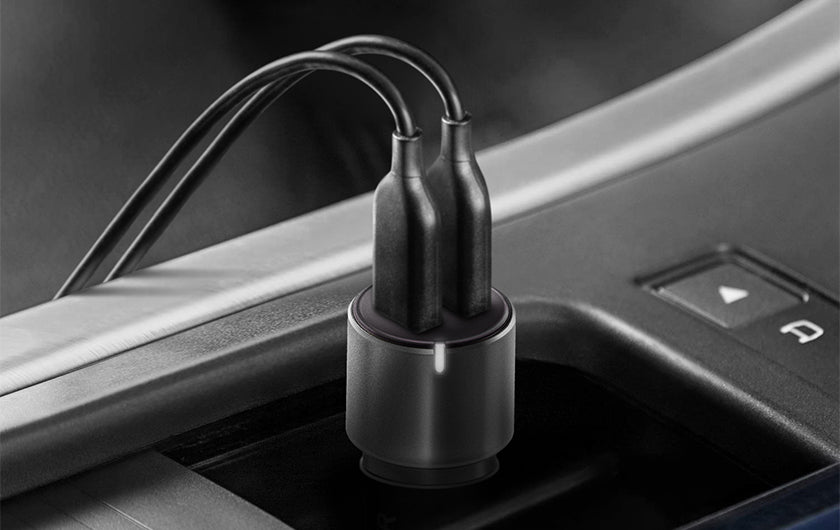
Many cigarette lighter sockets stay powered even with the ignition off, so a plugged-in charger continues drawing a small amount of current, typically 10-50mA, from the battery whether the engine is running or not. Cold weather shrinks a battery's reserve capacity, making that small, steady draw matter more. Heat adds a separate strain by degrading the battery chemically, so a charger left running in a hot, parked car stacks both problems at once. Unplugging it when you leave removes both risks, at no cost.
Don't use a car charger that doesn't fit securely in the cigarette lighter socket
A car charger that fits loosely in the cigarette lighter socket is better off being replaced sooner rather than later. Poor contact between the charger and the socket wall causes intermittent current delivery, which interrupts the charging process and can register on the phone as a repeated connect-disconnect cycle. Over time, the minor arcing that occurs at the point of loose contact degrades both the charger’s pin and the socket itself, which can eventually make the socket unreliable for any charger. Before buying, check that the charger’s diameter is compatible with your vehicle’s socket, and once you plug the charger in, confirm it sits flush and doesn’t shift when the cable is moved. If a charger that previously fit well has started to feel loose, the socket spring contacts may have worn down and should be inspected.
Don’t charge your phone in direct sunlight or on the dashboard
Temperatures inside a parked car can get surprisingly extreme. According to a recent article by The Star, studies show that dashboard surfaces can approach 100°C in hot climates. Placing a charging phone on or near the dashboard in these conditions creates a compounded thermal problem. Ambient heat from the surface, radiant heat through the windshield, and the heat generated by the charging process itself. Lithium-ion batteries exposed to sustained high temperatures experience accelerated capacity loss and, in extreme cases, heat-driven battery damage can trigger thermal runaway. This is the same thermal runaway-heating mechanism behind the powerbank fire incidents that have made headlines in recent years.
Don’t expect fast charging from the car’s built-in USB port
Factory-installed USB ports vary in output depending on the vehicle make and model, but many older and mid-range cars still ship with ports in the 5W to 12W range. This is a holdover from USB standards that predate modern fast-charging protocols like Quick Charge and USB Power Delivery. Even newer vehicles with improved USB output seldom match the speeds a dedicated car charger delivers, as these ports are designed primarily for data transfer and device compatibility rather than fast power delivery. A dedicated car charger plugged into the cigarette lighter socket bypasses this limitation entirely by drawing from the vehicle’s electrical system directly and delivering output at the wattage it’s rated for.
For those who prefer a cable-free setup, a wireless car charger is a convenient workaround, though not a speed-equivalent one. Mounted to the air vent or windshield and powered through the cigarette lighter socket, it draws independently from the vehicle's electrical system, so it isn't capped by the built-in USB ports. That said, wireless charging loses power to heat during the induction process, so it will still charge more slowly than a wired charger of the same rated wattage.
Don’t charge your phone while running heavy apps
Running navigation, video streaming, or any processor-intensive application puts a real load on the phone's processor, and charging adds a second heat source on top of that as the battery pulls in current. The two effects compound each other, and the problem gets worse inside a car, where ambient temperatures already run higher than a typical indoor setting. There's a practical downside too: an active processor draws power that would otherwise go toward charging, which means the phone actually charges slower than it would if left idle. Since both problems come from the same root cause, the fix is straightforward: hold off on heavier app use until the phone is done charging.
More Tips
There is more to using your phone charger in the car than plugging in and driving off. A few nuances don’t fit neatly into dos and don’ts but are useful to understand before you develop habits around them.
Check your car’s built-in USB port output before relying on it.
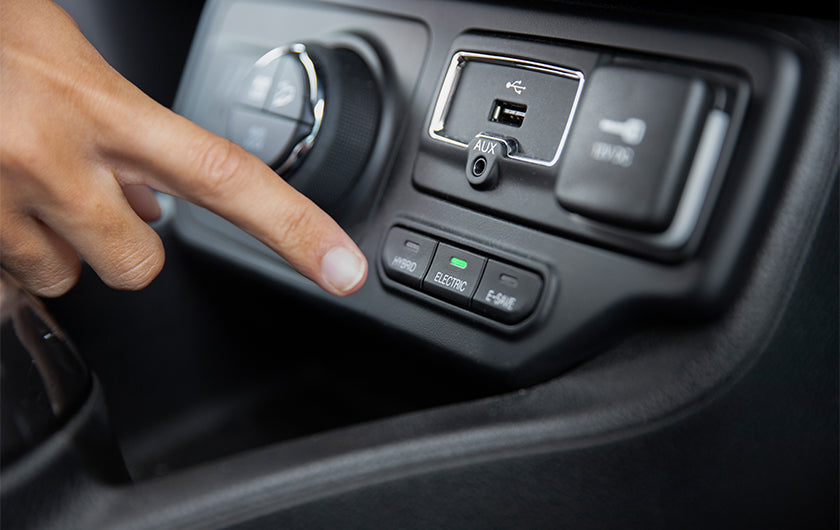
Factory USB ports often provide less power than dedicated car chargers, resulting in slower charging, particularly when your phone is in active use.
Let your phone warm up before expecting full wireless charging speed in cold weather.
Lithium-ion batteries regulate their own charge intake at low temperatures to protect the cells. If wireless charging is sluggish on a cold morning, it’s often the phone protecting its battery rather than a fault with your car charger.
Use separate ports if you need to charge your phone and a powerbank simultaneously.
Routing one through the other compounds heat from three sources at once. A multi-output car charger with independent ports is the cleaner solution.
Unplug your charger before jump-starting or working on your car’s electrical system.
Although quality chargers are designed to handle normal automotive voltage fluctuations, disconnecting them beforehand helps avoid unnecessary exposure to voltage transients.
If your phone is not charging despite being plugged in, check the socket fuse.
Cigarette lighter sockets are fuse-protected, and a blown fuse is a common and easily overlooked reason a car phone charger stops working. You can find the fuse rating in your vehicle’s manual.
Power Up on the Road With the Right Car Charger
Whether you’re after a wireless mount that keeps your phone in view or a wired adapter that covers multiple devices, Energea’s car charger range covers the main use cases. Here’s a closer look at what’s available.
-
MagArctic Drive: Among the most capable wireless options, delivering Qi2 25W output that charges an iPhone 17 from 0 to 50% in under 30 minutes. A built-in thermo cooling plate and fan actively dissipate heat during charging, addressing the single biggest drawback of wireless car charging in warm climates.
-
MagDrive Kit: A MagSafe-compatible magnetic wireless charger paired with a 30W USB-C car charger, with a 1.5kg magnetic hold strength that keeps the phone secure without a clamp or cradle. The omni-mount system works on the windshield, dashboard, or vent, giving it more placement flexibility than most single-mount alternatives.
-
AluDrive D60: A dual USB-C car charger with 66W total output and AmpSmart Technology that reads each device’s power requirements and adjusts current delivery accordingly. A practical wired option for drivers charging two devices simultaneously, with Power Delivery and PPS support at a price point that makes it an easy decision.
-
ArcDrive 84: An 84W car charger with a built-in 75cm retractable USB-C cable, a 33W USB-C port, and a USB-A Quick Charge 3.0 port at 18W max, covering up to three devices at once. Independent power management ensures each connected device charges at its own rated speed without sharing bandwidth, and the retractable cable keeps the setup tidy between uses.
Browse the full car charger collection.
The Right Habits and Products Make Car Charging Simple
A certified charger, a good-condition cable, sensible placement away from direct heat, and the habit of unplugging when the engine is off cover most of what’s needed for safe, consistent car charging. The method matters less than the discipline around it, and most of the common problems with car charging are avoidable with a little upfront attention, making for a noticeably better charging experience on every trip.
For drivers looking to upgrade their setup, Energea’s car charger range covers everything from MagSafe-compatible wireless mounts to high-output wired adapters built for everyday driving. Browse the full collection and find the right fit for your vehicle and devices.


